Form Exchange Flow Diagram
Visual flowchart of the complete Form Exchange process
Form Exchange Flow Diagram
This diagram illustrates the complete Form Exchange workflow, showing the interactions between Support Team and Forms Developer.
Basic Process Flow
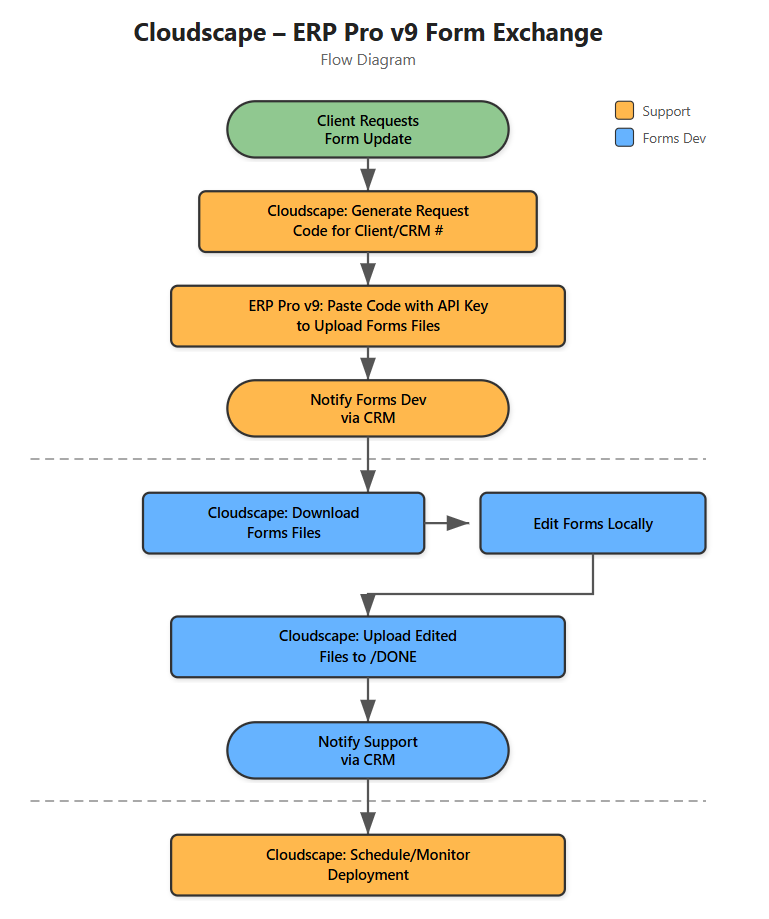
Key Handoff Points
| Step | From | To | Method | Purpose |
|---|---|---|---|---|
| 1 | Support | Forms Dev | CRM Notification | Files uploaded, ready for download |
| 2 | Forms Dev | Support | CRM Notification | Edited files ready for deployment |
| 3 | Support | CloudOps | Escalation | Report deployment failures |
Critical Decision Points
1. Changes Good? (Forms Dev)
- Yes → Upload to DONE and notify Support
- No → Continue editing and testing
2. Deploy Now? (Support)
- Immediately → Deploys in ~5 minutes
- Schedule Later → Specify exact date/time
3. Deployment Status? (Support)
- COMPLETED → Verify with client
- FAILED → Report failure to CloudOps team
Related Documentation
- Complete Workflow - Detailed step-by-step guide with screenshots
- Overview - Introduction to Form Exchange
- Troubleshooting - Common questions and solutions